
S c o r e E x a m O M R

OMR Sheet Evaluation Software

Fast. Accurate. Scalable. App + Web Portal. Excel & PDF Reports.

  • Home
  • OMR Sheet Evaluation Software

What is ScoreExam OMR Sheet Evaluation Software?

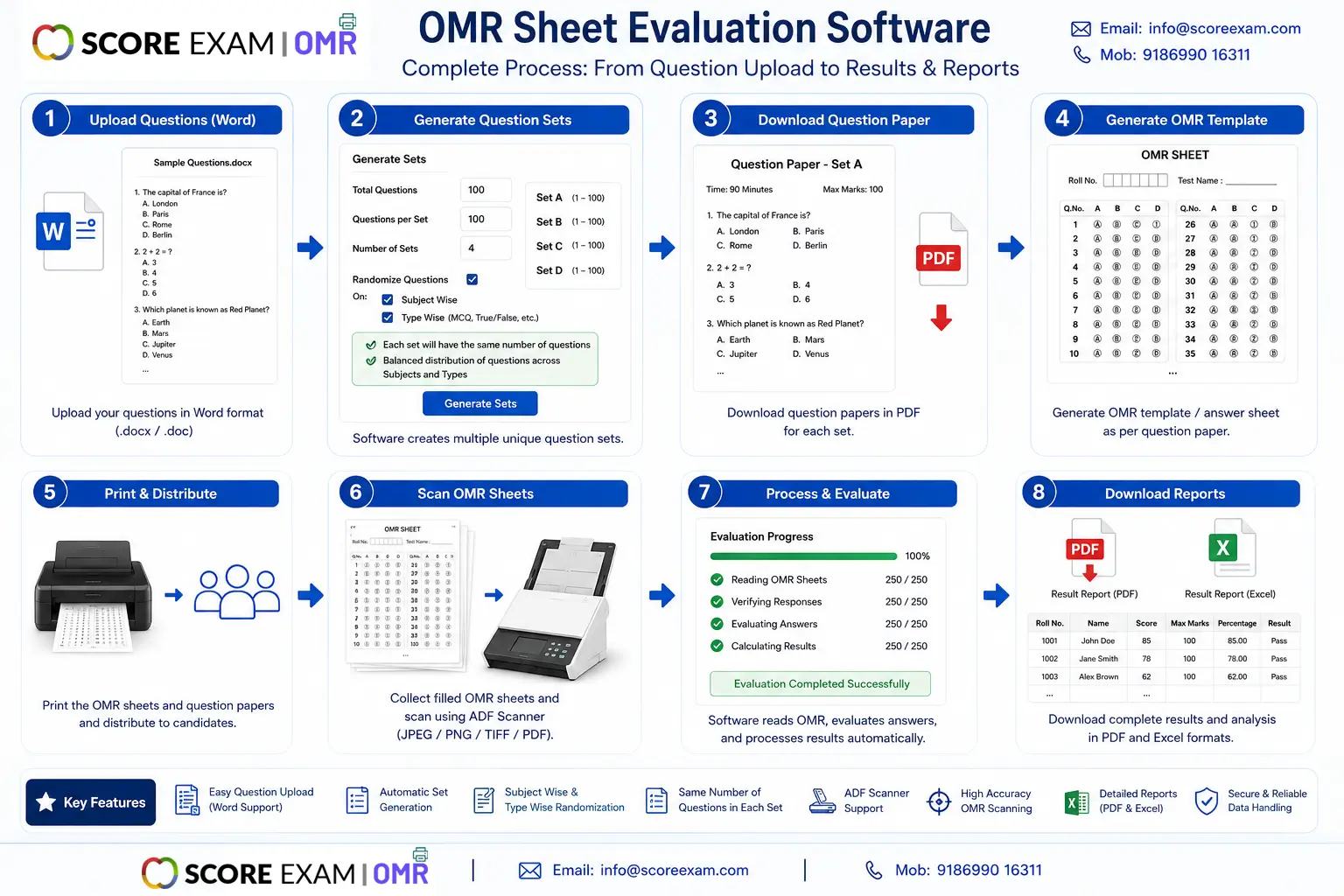
ScoreExam is a complete OMR Sheet Evaluation Ssoftware solution built for schools, colleges, coaching centers and assessment agencies. From live template creation and multi‑set generation to automated scanning and 100% accurate result processing, ScoreExam handles the entire OMR workflow — generation, scanning, evaluation and reporting.
Core Highlights

  • Live template creation: Design and customize OMR templates in minutes with drag-and-drop fields — no coding required.
  • Multi-set generation: Generate multiple sets automatically and print papers with shuffled questions. No manual set ordering.
  • Word import: Upload questions from MS Word (.docx) to automatically build papers and answer keys.
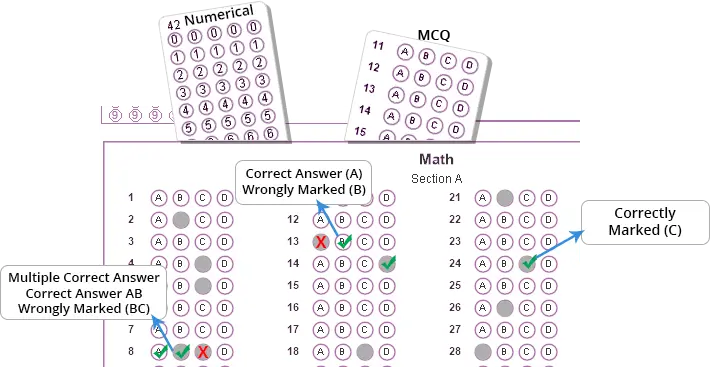
  • High-accuracy OMR evaluation: Industry-grade optical mark recognition engine for near 100% accuracy on properly scanned sheets.
  • Reports in Excel & PDF: Comprehensive exports — subject-wise, section-wise, student individual performance reports, response sheets and more.
  • App & web portal: Students and parents can view OMR results 24/7 on mobile apps and the web portal.
JEE Main and JEE Advanced

Why Choose ScoreExam?

ScoreExam isn’t just an OMR sheet checker — it’s a full workflow platform. Whether you need an OMR sheet scanner for bulk evaluation or an OMR grading software that exports ready-to-use Excel reports, ScoreExam delivers speed, accuracy, and transparency.

Supported Outputs & Exports

  • PDF scorecards for students and parents
  • Excel spreadsheets with detailed metrics
  • Response sheets and answer logs for audits

Book Demo — also available as an OMR sheet evaluation software free download trial package.

Features that Matter

  • Automatic set shuffling & paper generation (multi-set generation tool)
  • Batch scanning with desktop scanners or mobile camera
  • Custom marking schemes, negative marking, partial credit
  • Real-time validation and mismatch alerts during scanning
  • Student portal & parent access — 24/7 availability
  • Secure data export and cloud backup options
Integrations

Import/export with MS Word, Excel, LMS integrations and SIS platforms. Works with standard sheet sizes and common scanner drivers.
JEE Main and JEE Advanced

How it works — simple 4 steps

  1. Create template: Use the live template designer to position OMR bubbles, headers and fields.
  2. Generate papers: Use the multi-set generation tool to create multiple sets and download print-ready PDFs.
  3. Scan & evaluate: Scan answer sheets in batches or capture via mobile app. ScoreExam recognizes marks and evaluates instantly.
  4. Reports & portal: Export Excel/PDF reports and share results via the student web portal and mobile apps.

Frequently Asked Questions

Q: Is ScoreExam really 100% accurate?
A: ScoreExam's OMR engine reaches near-100% accuracy on properly printed and scanned sheets. Accuracy depends on scan quality, correct template setup and sheet alignment.

Q: Can I import questions from Word?
A: Yes — the Word import (.docx) tool parses questions and builds multiple sets automatically.

Q: Do you offer a free download?
A: We provide a free trial package — download from the link above or contact sales for campus licensing.

Phone: 8699016311, 9041834177
Website: www.scoreexam.com

Get a Free Demo

Quick Facts
  • Product: ScoreExam OMR software
  • Platforms: Windows / Web / Android / iOS
  • Best for: Schools, coaching institutes, testing agencies
  • Exports: Excel, PDF, CSV
Trial

Get the OMR sheet evaluation software free trial — Call Us for Trial

Contact

Email: info@scoreexam.com
Phone: +91-8699016311

Student Portal & Mobile App

Students can view their OMR sheet evaluation results anytime. App features include interactive report views, subject-wise analytics, and downloadable scorecards.

Customer Testimonial
"ScoreExam reduced our evaluation time from days to minutes. The multi-set generation and Excel exports are lifesavers for large-scale tests."